

Turn your jobs into an ordered workflow
Two jobs, one arrow. The workflow decides when each runs — never what data passes between them.
1. Objective
Goal
Bring a second job into the workflow, order the two with an edge, run the pair, and read the log closely enough to learn what an arrow does — and what it does not.
Keep one cumulative Studio project named studio-course, one manual workflow named first-workflow, and one job named first-job. Each lesson builds on the state saved by the previous one.
Prerequisites
- Hydra API started with
hdrctl serve. - Studio started from
Hydra/studiowithnpm run dev. - A first job that already runs.
2. Steps
01Bring in a second job
Objective
Add a job to a workflow that already holds one.
Actions
- Open Workflow configuration.
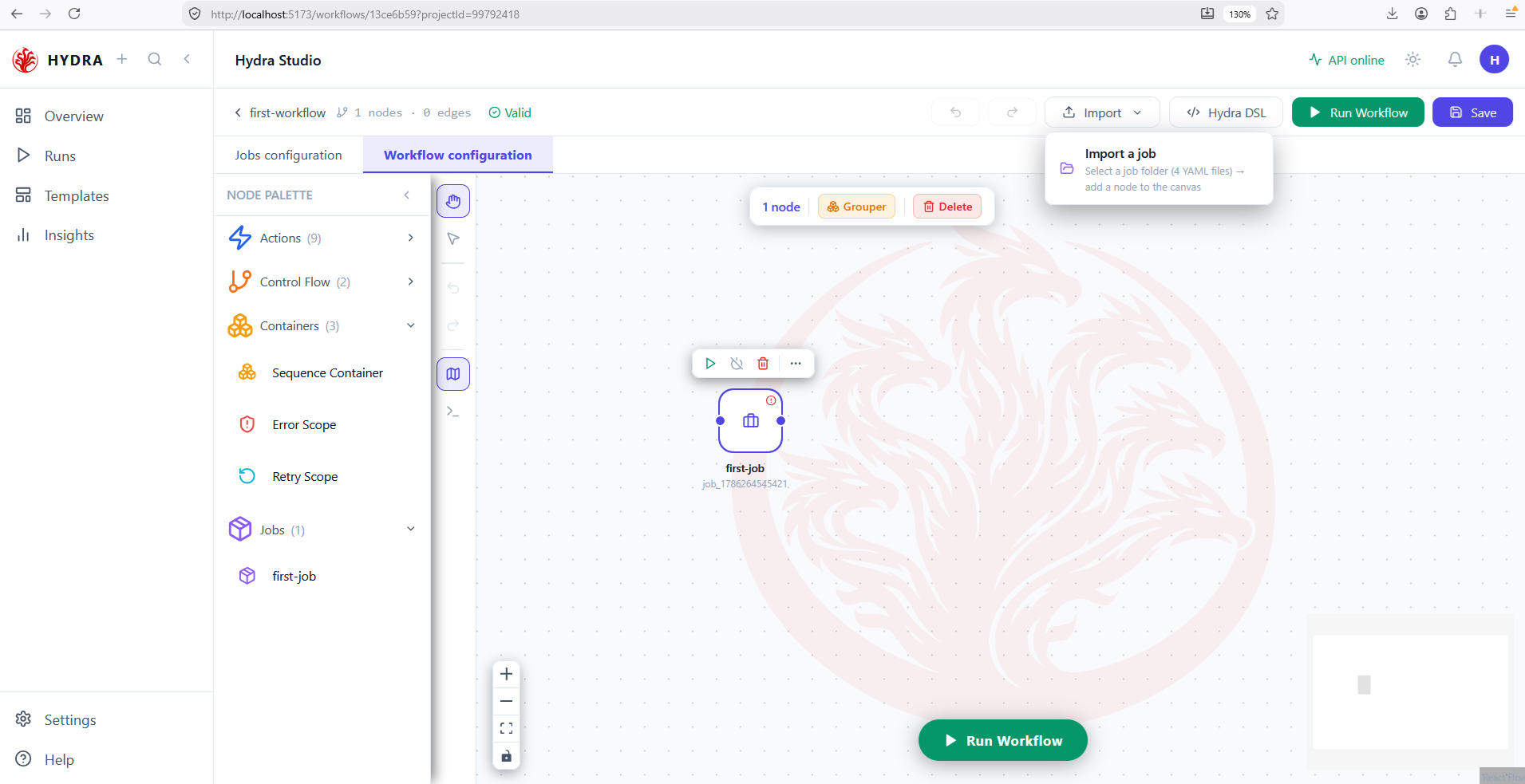
- Select Import, then Import a job.
- Pick the folder of the job you want to add.
Workflow configuration → Import → Import a job
Nothing distinguishes the second job from the first: same gesture, same four manifests, same result. A workflow does not care how many jobs it holds, only how they are ordered.
The canvas still shows one node and the palette still counts one job — until the import completes.
first-workflow   1 nodes · 0 edges   Valid
Jobs (1)
  first-job
02Order the two with an edge
Objective
Say which job waits for which.
Actions
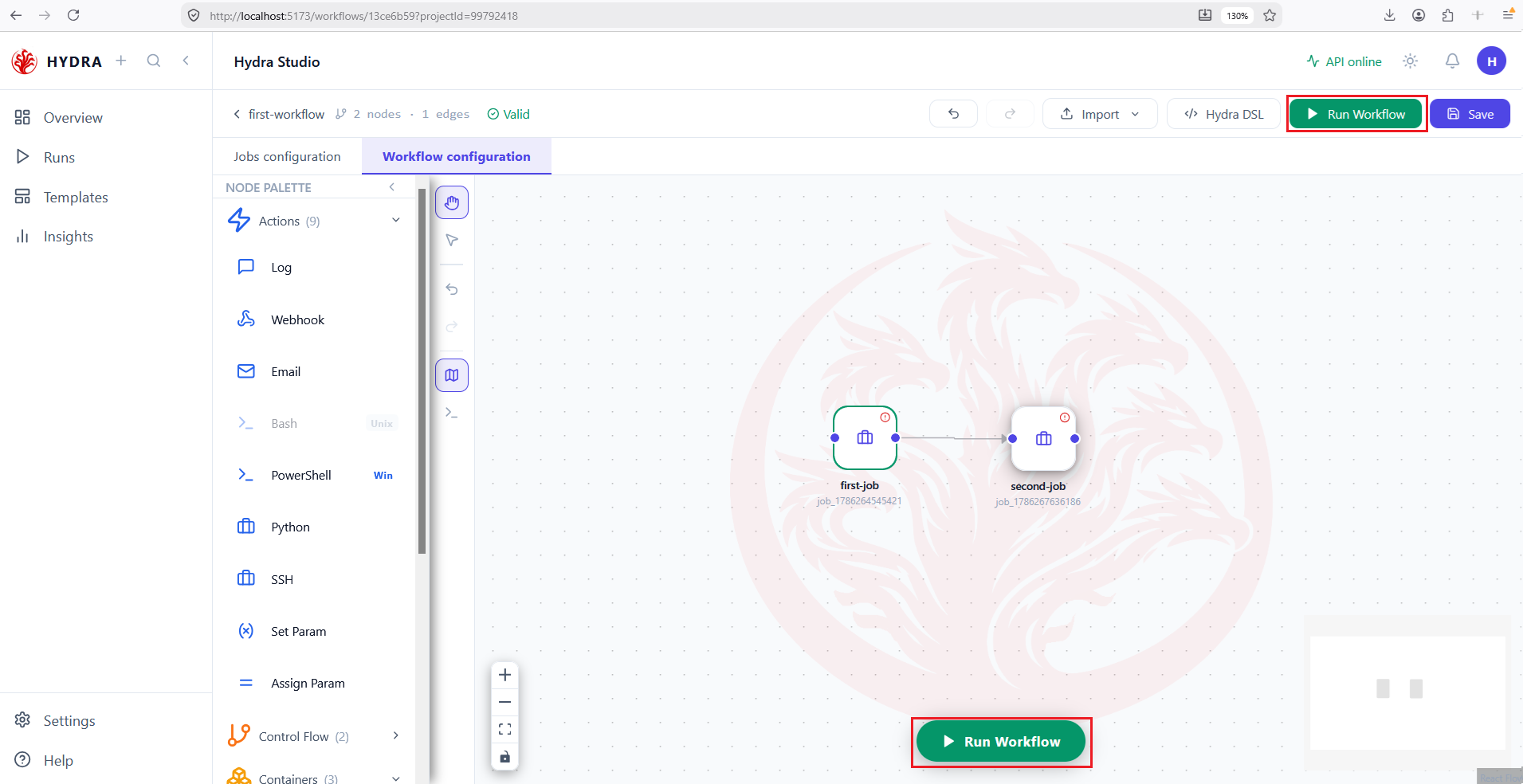
- Place the second node to the right of the first.
- Drag from the right handle of
first-jobto the left handle ofsecond-job. - Read the counters in the header.
first-job → second-job
That single arrow is the whole composition. It becomes a depends_on in the manifest, and it means one thing only: second-job starts after first-job has finished. Without it, the two would be independent and could run at the same time.
Two nodes, one edge, and the workflow still reading Valid.
first-workflow   2 nodes · 1 edges   Valid
first-job → second-job
03Run the pair
Objective
Execute the whole graph and confirm the order was respected.
Actions
- Select Run Workflow.
- Open the Logs tab.
- Read the two step blocks from top to bottom.
Workflow configuration → Run Workflow
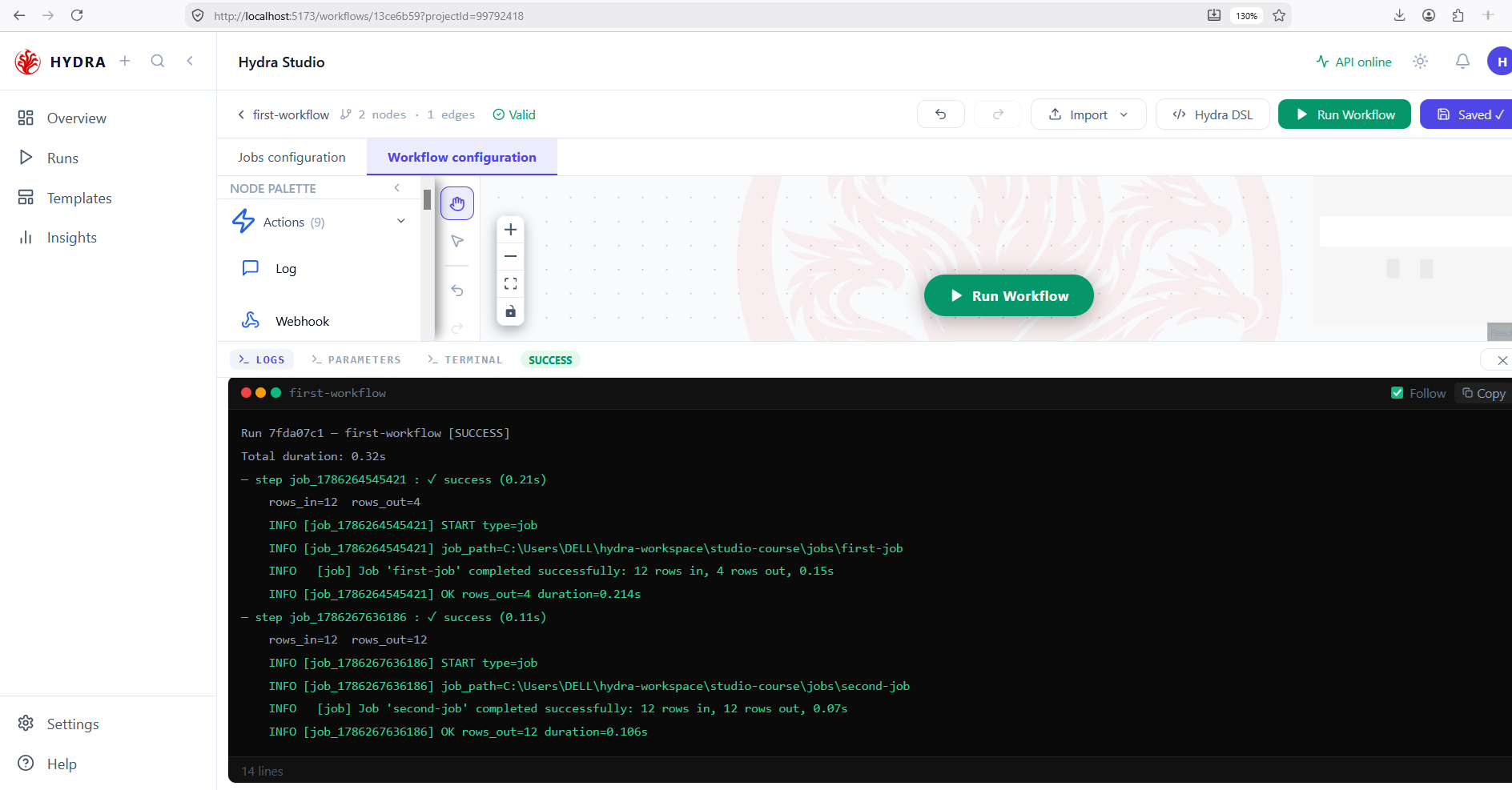
One run, two steps, in the order the edge imposed. Each step reports its own counters and its own job_path — a workflow log is a stack of job logs with a summary on top.
Two blocks, each ending on OK, and a total duration greater than either step alone.
Run 7fda07c1 — first-workflow [SUCCESS]
Total duration: 0.32s
- step job_1786264545421 : ✓ success (0.21s)
    rows_in=12  rows_out=4
- step job_1786267636186 : ✓ success (0.11s)
    rows_in=12  rows_out=12
04Read what the arrow did not do
Objective
Learn the single most important thing about composing jobs.
Actions
- Compare
rows_outof the first step withrows_inof the second. - Read the
job_pathline of each step. - Open
sources.yamlof the second job.
rows_out=4 → rows_in=12
The first job wrote 4 rows. The second read 12. Nothing was lost — the second job simply never looked at what the first produced. It read its own source, exactly as declared in its own sources.yaml.
A workflow edge is a dependency, not a pipe. It says run this one after that one and nothing more. No data travels along it, and no column is passed. To chain two jobs on data, the second must read the file the first wrote — you declare that in its source, not on the canvas.
| What you want | Where you declare it |
|---|---|
| Run B after A | An edge on the workflow canvas |
| B reads what A wrote | The source of B, pointing at the destination of A |
| Both at once | Both — they are independent decisions |
Two job_path lines naming two different folders, and two sets of counters that owe each other nothing.
job_path=…\studio-course\jobs\first-job    rows_in=12  rows_out=4
job_path=…\studio-course\jobs\second-job   rows_in=12  rows_out=12
05Read the composition as YAML
Objective
Find the arrow in the file, and confirm it is the only trace of it.
Actions
- Select Hydra DSL in the top bar.
- Read the two entries under
steps. - Find
depends_onon the second one.
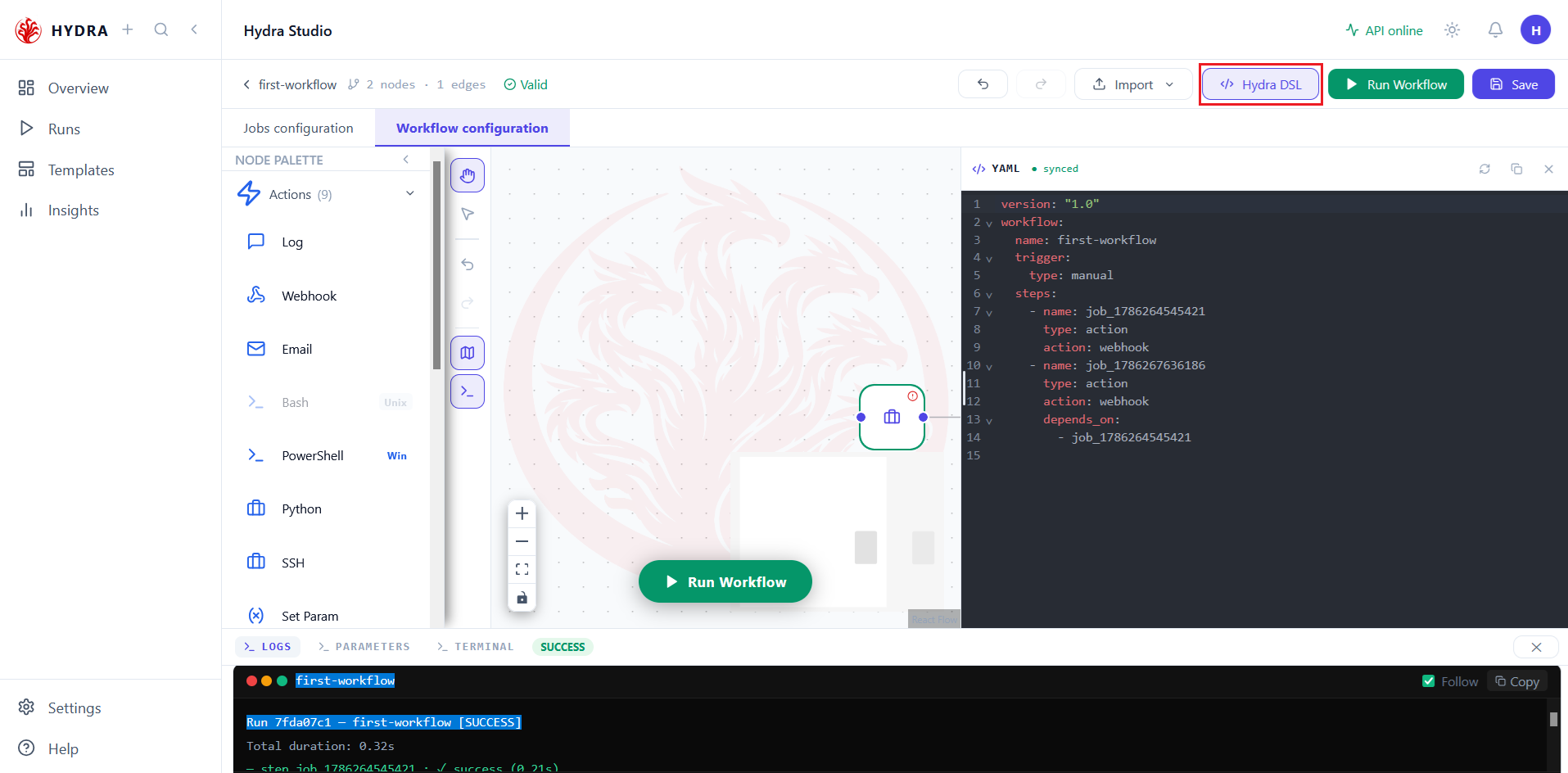
Workflow configuration → Hydra DSL
Two steps, and one depends_on. The first has none, so it starts immediately; the second names the first, so it waits. Add a third job with the same dependency and the two would run in parallel — order comes from the names, never from the positions on the canvas.
version: "1.0"
workflow:
  name: first-workflow
  trigger:
    type: manual
  steps:
    - name: job_1786264545421
      type: action
      action: webhook
    - name: job_1786267636186
      type: action
      action: webhook
      depends_on:
        - job_1786264545421
Both steps here read type: action with action: webhook, although the canvas holds two jobs. That is the serialization defect already described in lesson 8, not a rule to learn. A job step should read type: job with a job path. The depends_on line, however, is correct — the composition you drew is faithfully recorded.
One depends_on for one arrow. Nothing else in the file describes the relationship.
depends_on you read.Tips and traps
An edge becomes a depends_on. That single line is the whole composition.
An arrow orders, it does not connect. No data travels along it.
To chain on data, point the source of B at the destination of A. That lives in the job, not the canvas.
Two steps sharing a dependency run in parallel. Position on the canvas decides nothing.
A workflow log is a stack of job logs. Each step keeps its own counters and its own path.
Comparing rows_out and the next rows_in only means something if B reads what A wrote.
Importing the second job is the same gesture as the first. A workflow does not count.
A step with no depends_on starts immediately, whatever it sits beside.
3. Checklist
| Verification | Expected result |
|---|---|
| Import | The second job appears as a node and in the palette |
| Edge | The header reads 2 nodes · 1 edges |
| Run | Two steps, in the order of the arrow |
| Counters | Each step reports its own rows_in and rows_out |
| Paths | Two different job_path lines |
| YAML | One depends_on for one arrow |
4. Troubleshooting
| Symptom | Cause | Fix |
|---|---|---|
| The second step ignores the first's output | An edge orders, it does not pass data | Point the source of the second job at the destination of the first |
| Both steps start together | No edge between them | Draw one from the right handle to the left handle |
| The edge refuses to connect | Wrong handle, or wrong direction | Always leave a right handle and enter a left one |
| The second job reads nothing | The first has not written yet, or wrote elsewhere | Check the destination path of the first against the source of the second |
Job steps serialized as action: webhook | Known serialization defect | Expected for now; depends_on is still correct |
5. Next lesson
Two jobs now run in order. The last lesson asks what happens when one of them fails — and how a container decides whether the rest carries on.