

Read the manifests Studio generates
The canvas shows what you drew. The YAML shows what will run. This lesson is about reading the second one, because that is where you find what the first one leaves out.
1. Objective
Goal
Open the Hydra DSL panel in both scenes, walk through the four job tabs, and learn to read them critically. A node drawn is not a node configured, and the YAML is where the difference shows.
Keep one cumulative Studio project named studio-course, one manual workflow named first-workflow, and one job named first-job. Each lesson builds on the state saved by the previous one.
Prerequisites
- Hydra API started with
hdrctl serve. - Studio started from
Hydra/studiowithnpm run dev. - A job holding at least a source.
2. Steps
01Open the panel
Objective
Find the DSL view, and notice that it follows the scene.
Actions
- Select Hydra DSL in the top bar.
- Read the label at the top left of the panel.
- Switch scenes and watch the label change.
Top bar → Hydra DSL
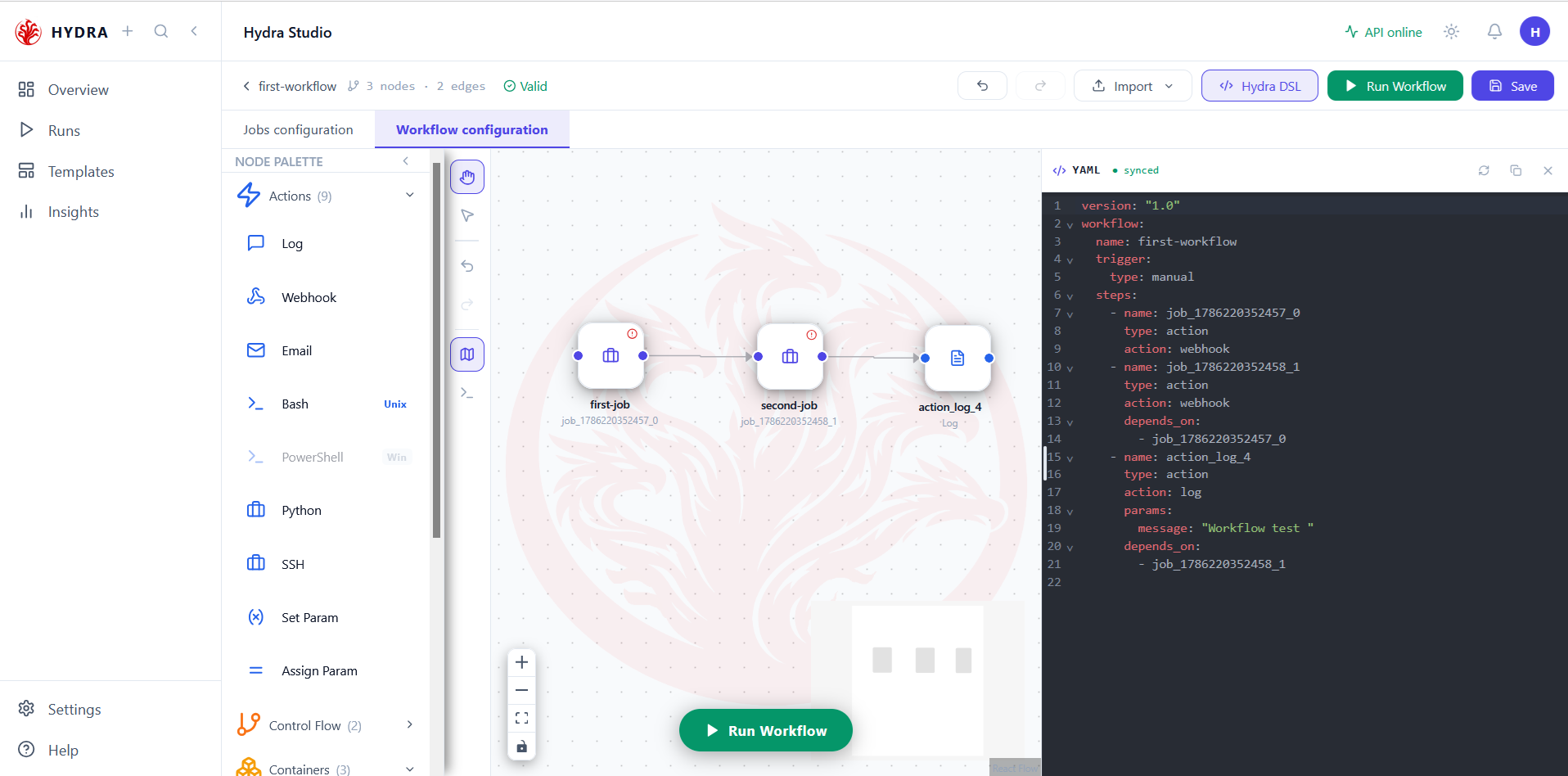
One button, two views. In Workflow configuration the panel shows a single file, workflow.yaml, marked synced when it matches the canvas. In Jobs configuration it shows the job, marked multi-section because a job is four files, not one.
The panel opens beside the canvas, and both stay visible. You can select a node and read its YAML at the same time.
YAML   synced          ← workflow scene
JOB    multi-section   ← job scene
02Read the workflow file
Objective
Match every node on the canvas with an entry under steps.
Actions
- Stay in Workflow configuration.
- Read
name,trigger, then each step. - Compare each
depends_onwith an arrow on the canvas.
Workflow configuration → Hydra DSL
The file opens with what the workflow is — its name and its trigger — then lists the steps in the order the graph imposes. Each depends_on is an edge, written as a name rather than drawn as an arrow.
version: "1.0"
workflow:
  name: first-workflow
  trigger:
    type: manual
  steps:
    - name: job_1786220352457_0
      type: action
      action: webhook
    - name: job_1786220352458_1
      type: action
      action: webhook
      depends_on:
        - job_1786220352457_0
    - name: action_log_4
      type: action
      action: log
      params:
        message: "Workflow test "
      depends_on:
        - job_1786220352458_1
Three steps for three nodes, and the chain reads correctly: the second waits for the first, the log waits for the second. The Log step is exactly what you configured — its action and its message are there.
On the canvas these are first-job and second-job, yet the file writes them as type: action with action: webhook. That is wrong, and it is a serialization defect being fixed, not a rule to learn. A job step should read:
    - name: first-job
      type: job
      job: ./jobs/first-job
Until the fix lands, a workflow saved this way runs no job. It is also why the step names show internal identifiers instead of the names on the canvas. Reading the YAML is what makes such a defect visible at all — which is the point of this lesson.
One entry per node, in dependency order, and a depends_on for every arrow.
03Read a job, section by section
Objective
Walk the four tabs in the order a job runs.
Actions
- Switch to Jobs configuration and open Hydra DSL.
- Select Sources, and read the connector block.
- Note the identifier on the first indented line.
Jobs configuration → Hydra DSL → Sources
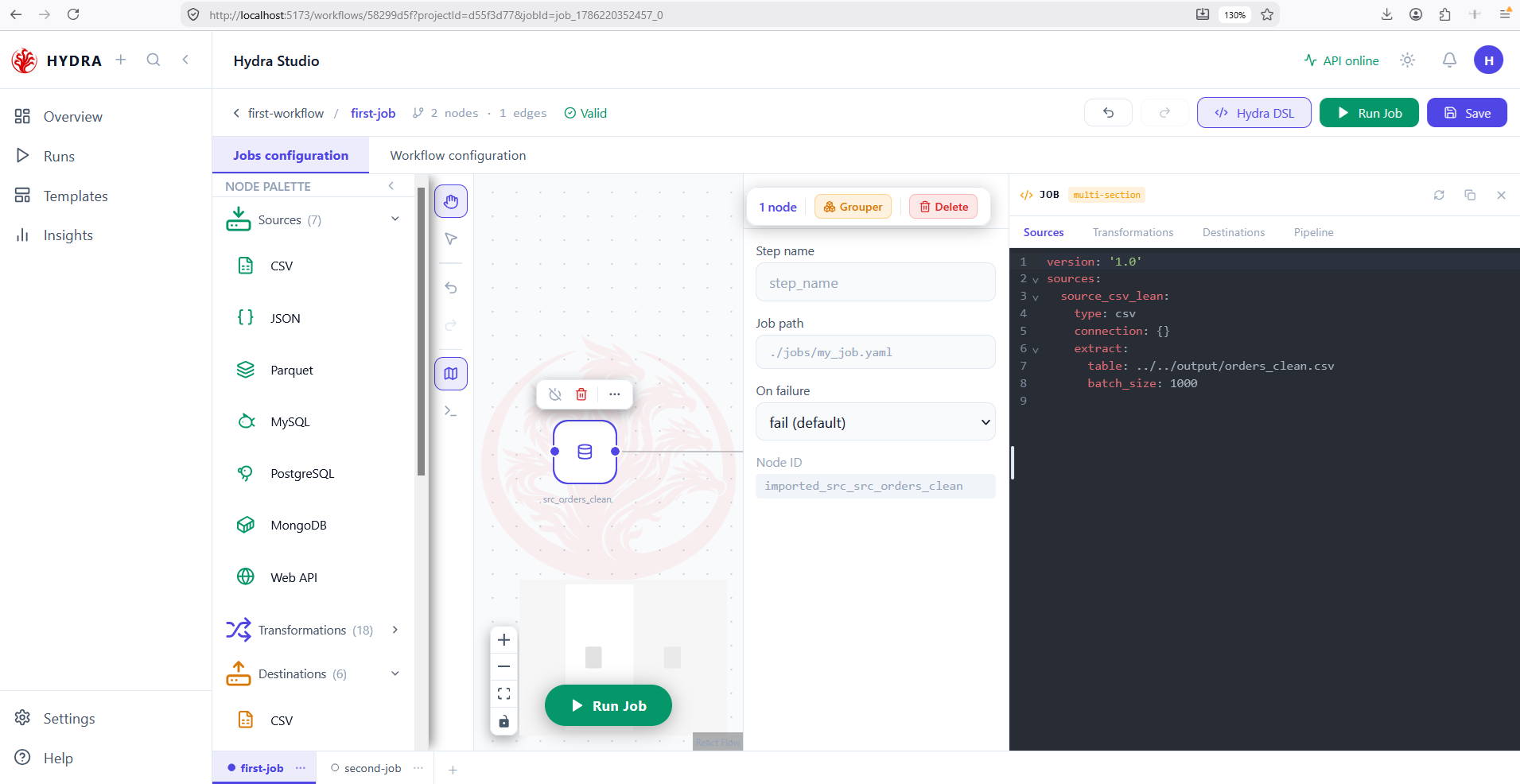
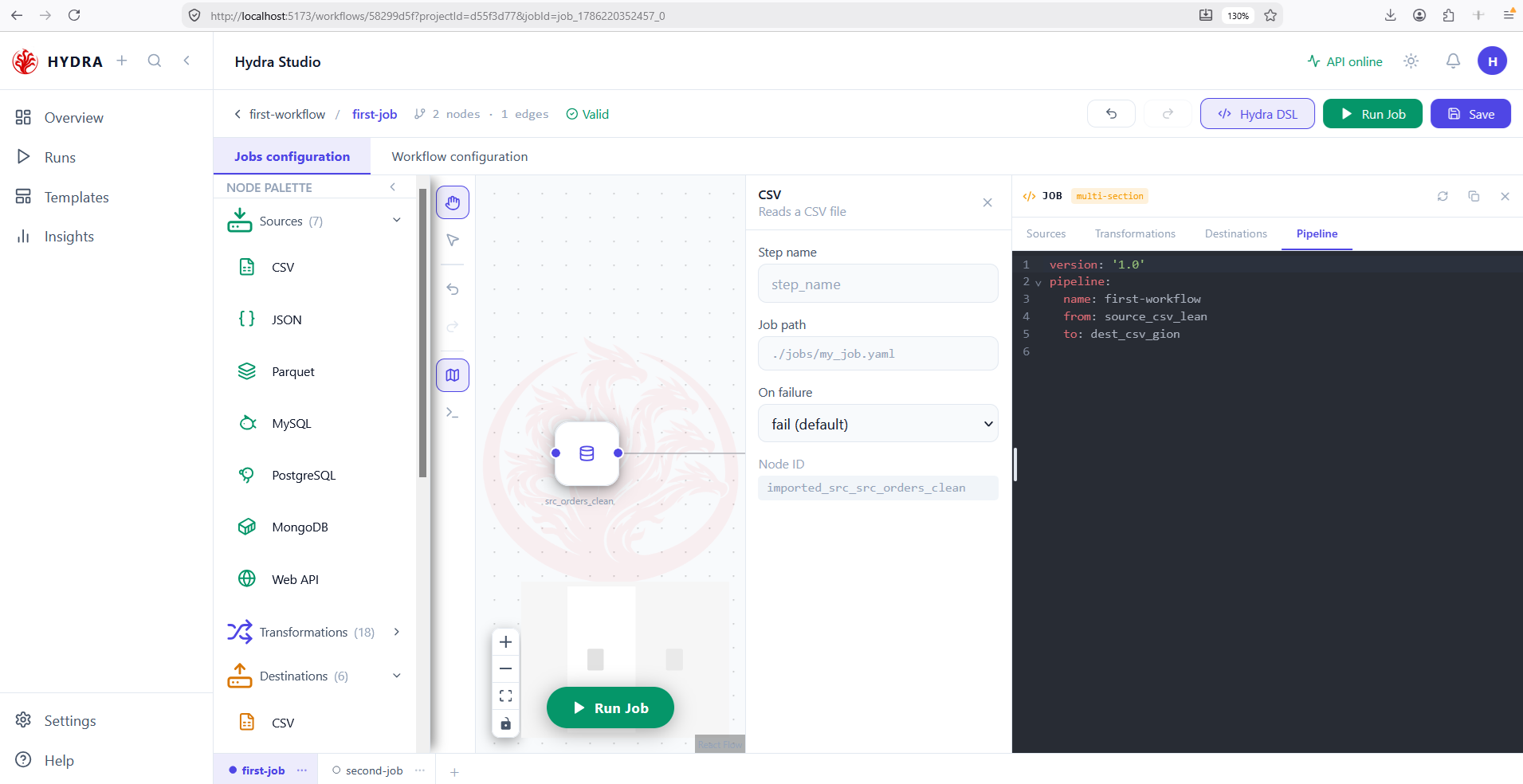
A job is four files, and the panel gives one tab to each. Read them in order and the job explains itself: where the data comes from, what happens to it, where it goes, and how the three are wired.
version: '1.0'
sources:
  source_csv_lean:
    type: csv
    connection: {}
    extract:
      table: ../../output/orders_clean.csv
      batch_size: 1000
source_csv_lean is the identifier, not the file. It is what pipeline.yaml will point at. connection: {} is empty because a CSV needs no connection — the path alone is enough. batch_size was never typed by hand; it is a default Studio writes for you.
Four tabs, and the source block matching the node you configured.
Sources Transformations Destinations Pipeline
04Read what is missing
Objective
Use the panel for what it is best at — showing absence.
Actions
- Select the Transformations tab.
- Select the Destinations tab.
- Compare both with what you intended to build.
Hydra DSL → Transformations · Destinations
This is where the panel earns its place. The canvas draws a node whether or not it is complete; the YAML writes exactly what that node holds, and nothing more.
version: '1.0'
transformations:
  steps: []
version: '1.0'
destinations:
  dest_csv_gion:
    type: csv
    connection: {}
    load:
      table: ''
      mode: replace
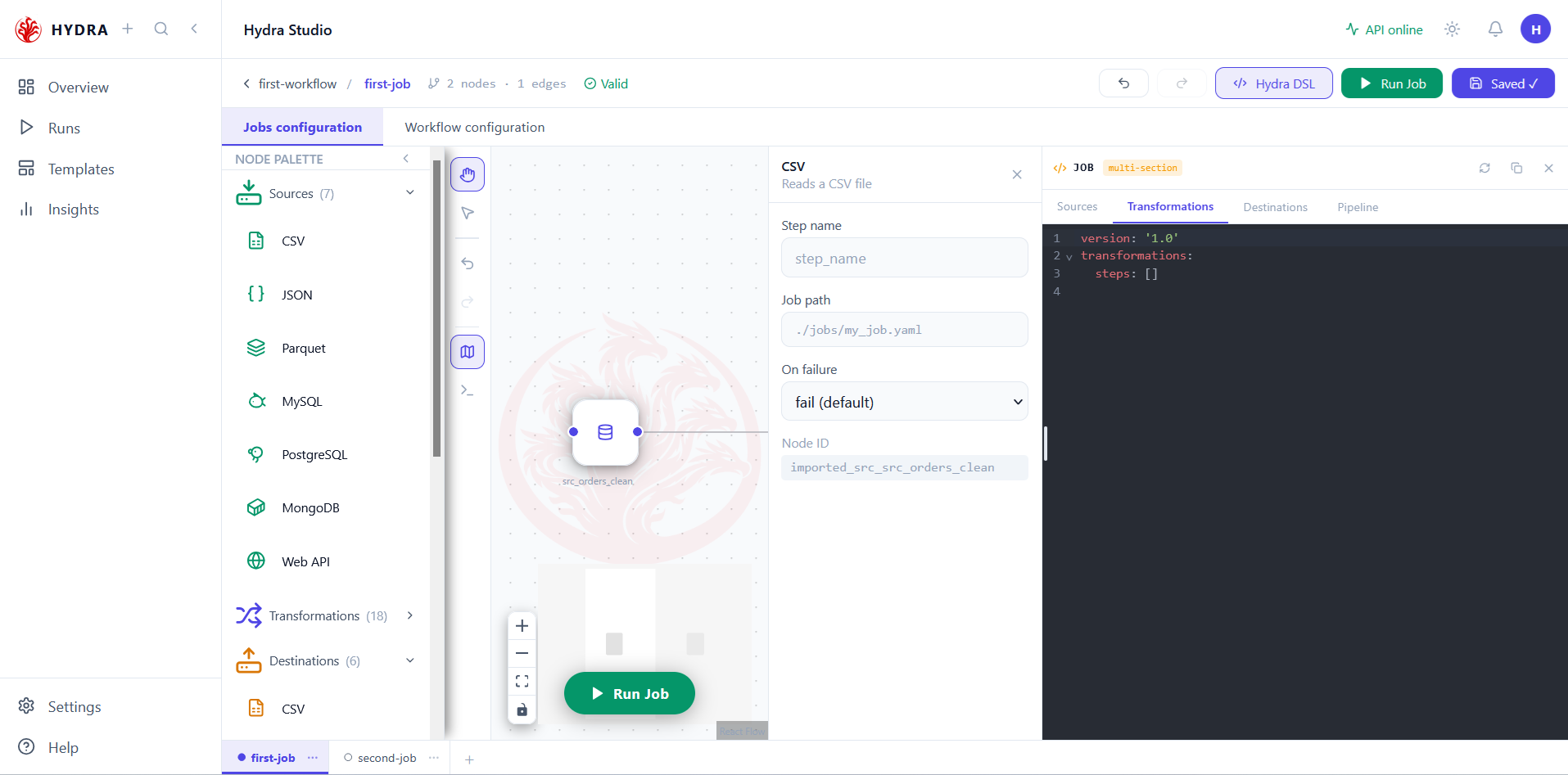
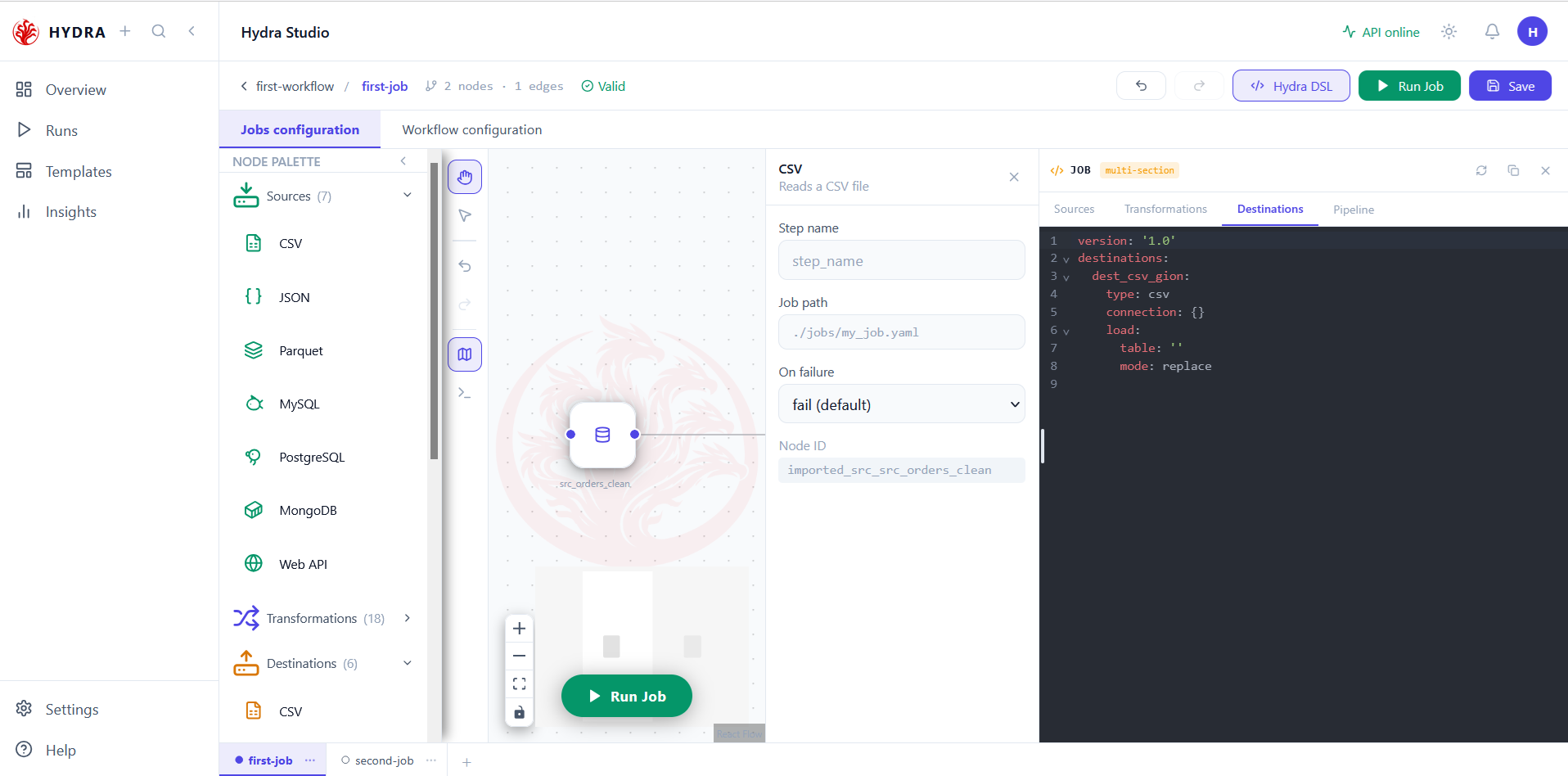
table is an empty string — no output path was ever set.| What you read | What it means | What to do |
|---|---|---|
steps: [] | No transformation was placed, or none was connected. | Add one, or accept a job that only copies. |
table: '' | The destination exists but has no output path. | Open the node and fill the field marked with a red asterisk. |
connection: {} | Normal for a file connector. | Nothing — a path is all a CSV needs. |
Both lines above are refused by hdrctl validate: a destination table must hold at least one character, and a transformation list at least one entry. So a job can look finished on screen and still not run. The panel shows you why before the run does.
destinations.dest_csv_gion.load.table
  String should have at least 1 character
steps
  List should have at least 1 item after validation, not 0
Two blocks that are syntactically fine and semantically empty. That combination is exactly what a canvas cannot show you.
05Read the wiring
Objective
Confirm the two ends of the job refer to the identifiers you just read.
Actions
- Select the Pipeline tab.
- Compare
fromwith the identifier in Sources. - Compare
towith the identifier in Destinations.
Hydra DSL → Pipeline
The shortest file of the four, and the one that ties the others together. It holds identifiers, never paths — which is what lets you repoint a source at another file without touching the wiring.
version: '1.0'
pipeline:
  name: first-workflow
  from: source_csv_lean
  to: dest_csv_gion
One from, one to — a job reads from one place and writes to one place. The name line is written by Studio for readability; the engine reads from and to and ignores the rest.
Both identifiers resolving to blocks you have already read. If one does not, the job will fail before reading a single row.
from: source_csv_lean   → sources.source_csv_lean
to:   dest_csv_gion     → destinations.dest_csv_gion
Tips and traps
The panel follows the scene: one file in a workflow, four tabs in a job.
A node drawn is not a node configured. The canvas hides that; the YAML does not.
Read a job in tab order — sources, transformations, destinations, pipeline. It tells its own story.
An empty table: '' or steps: [] is valid YAML and an invalid job. Syntax is not meaning.
pipeline.yaml holds identifiers, never paths. That indirection is what makes a source replaceable.
The synced marker says the panel matches the canvas — not that the file on disk is saved.
An empty connection: {} is normal for a file connector. A path is all it needs.
Trust hdrctl validate over any badge. The engine is stricter than the editor.
3. Checklist
| Verification | Expected result |
|---|---|
| Workflow panel | One file, marked synced |
| Job panel | Four tabs, marked multi-section |
| Steps | One entry per node, in dependency order |
| Source block | Its identifier matches pipeline.from |
| Destination block | Its identifier matches pipeline.to, and table is not empty |
| Transformations | One entry per node on the chain |
4. Troubleshooting
| Symptom | Cause | Fix |
|---|---|---|
steps: [] although nodes exist | The transformations are not connected to the chain | Draw the edges from the source through to the destination |
table: '' | The destination has no output path | Open the node and fill the required field |
from resolves to nothing | The source was renamed after the wiring | Reopen the source and align the identifiers |
Job steps written as action: webhook | Known serialization defect | Expected for now; a job step should read type: job |
| The panel disagrees with the disk | The workflow was not saved | Press Save, then read the file itself |
5. Next lesson
You can now read what Studio writes, and spot what it leaves empty. The next lesson turns that reading into a verdict: what Valid covers, what it does not, and how to reach a job that actually runs.