

Reshape the data between source and destination
Eighteen operations sit between where data comes from and where it goes. Place them in order — the canvas will not let you do otherwise.
1. Objective
Goal
Place a transformation after your source, learn the eighteen the palette offers, and understand the two rules the canvas enforces without asking: the order nodes may take, and how many streams may meet.
Keep one cumulative Studio project named studio-course, one manual workflow named first-workflow, and one job named first-job. Each lesson builds on the state saved by the previous one.
Prerequisites
- Hydra API started with
hdrctl serve. - Studio started from
Hydra/studiowithnpm run dev. - A job holding at least one configured source.
2. Steps
01Read the eighteen operations
Objective
See the whole catalogue once, so you stop writing by hand what already exists.
Actions
- Open Jobs configuration and expand Transformations.
- Read the list from Filter to Script.
- Note that Script closes the list, and why.
Jobs configuration → Transformations (18)
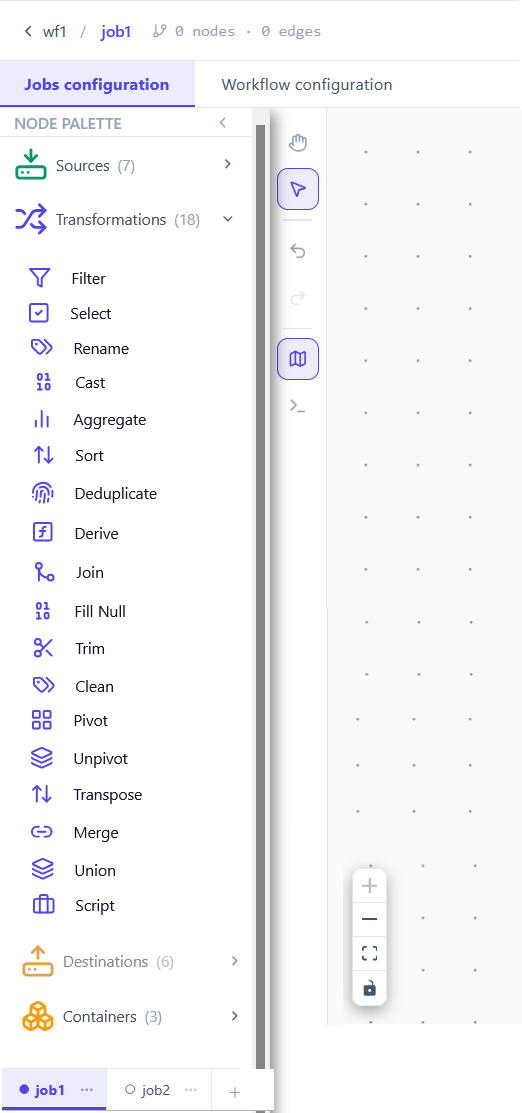
Seventeen named operations, then one escape hatch. Grouping them by intent is faster than memorising eighteen names — when you know which family you need, the name follows.
| Family | Operations | What it does to the table |
|---|---|---|
| Choose | Filter · Select · Deduplicate | Keeps fewer rows, or fewer columns. Nothing is invented. |
| Change | Rename · Cast · Derive · Fill Null · Trim · Clean | Same rows, same count — the values or the headers change. |
| Reshape | Sort · Aggregate · Pivot · Unpivot · Transpose | The shape itself moves: order, grouping, rows becoming columns. |
| Combine | Join · Merge · Union | Two streams enter, one comes out. |
| Escape | Script | Your own Python, when none of the seventeen fits. |
The full list under the source category, and the destination category below it. The palette reads in the order a job runs.
Filter  Select  Rename  Cast  Aggregate  Sort  Deduplicate  Derive  Join
Fill Null  Trim  Clean  Pivot  Unpivot  Transpose  Merge  Union  Script
02Place one, and connect it
Objective
Insert a transformation between the source and whatever comes next.
Actions
- Drag Filter onto the canvas, to the right of your source.
- Drag from the source's right handle to the transformation's left handle.
- Double-click the node and give it an expression.
Transformations → Filter → connect → configure
A transformation reads what enters its left handle and passes the result out of its right one. Like a source, it wears a red badge until its required field is answered — for Filter, that is the expression.
Two nodes, one edge, and the counter rising. The badge clears when the expression is saved.
wf1 / job1   2 nodes · 1 edges   Valid
source_csv_1 → transform_filter_2
03Chain as many as the work needs
Objective
Build a sequence, and learn that its order is its meaning.
Actions
- Add a second transformation after the first.
- Connect them in the order you want them applied.
- Open the Hydra DSL panel and read the Transformations tab.
Hydra DSL → Transformations
The chain on the canvas becomes an ordered list in the manifest, and the engine runs it top to bottom. That order is not cosmetic: filtering before casting is not the same job as casting before filtering. The first may compare text where the second compares numbers.
One entry per node, in exactly the order the edges describe.
transformations:
  steps:
    - filter:
        expr: "amount > 100"
    - select:
        columns: [id, order_date, amount]
04The canvas imposes an order
Objective
Discover the rule you cannot break, and stop fighting it.
Actions
- Try to draw an edge from a transformation back into a source.
- Try to place a destination before a transformation.
- Watch the connection be refused.
source → transformation → destination
A job flows one way, and the canvas enforces it. A source has no input, so nothing can feed it. A destination has no output, so nothing can follow it. Everything else sits between the two, in the order you draw.
| Node | Accepts input | Produces output |
|---|---|---|
| Source | no — it is the beginning | yes |
| Transformation | yes | yes |
| Destination | yes | no — it is the end |
An edge that refuses to connect is almost never a bug. Check three things, in this order: you started from a right handle, you ended on a left handle, and the direction respects source to destination. A transformation cannot feed a source, and nothing can follow a destination.
The refused edge simply does not appear. No dialog, no error — the gesture is undone.
source        →  no left handle
destination   →  no right handle
05Several sources, one node
Objective
Bring two streams together, and see where branching is allowed.
Actions
- Add a second source to the job — a different format is fine.
- Drag a Join, Merge or Union onto the canvas.
- Connect both sources to that single transformation.
two sources → Join → destination
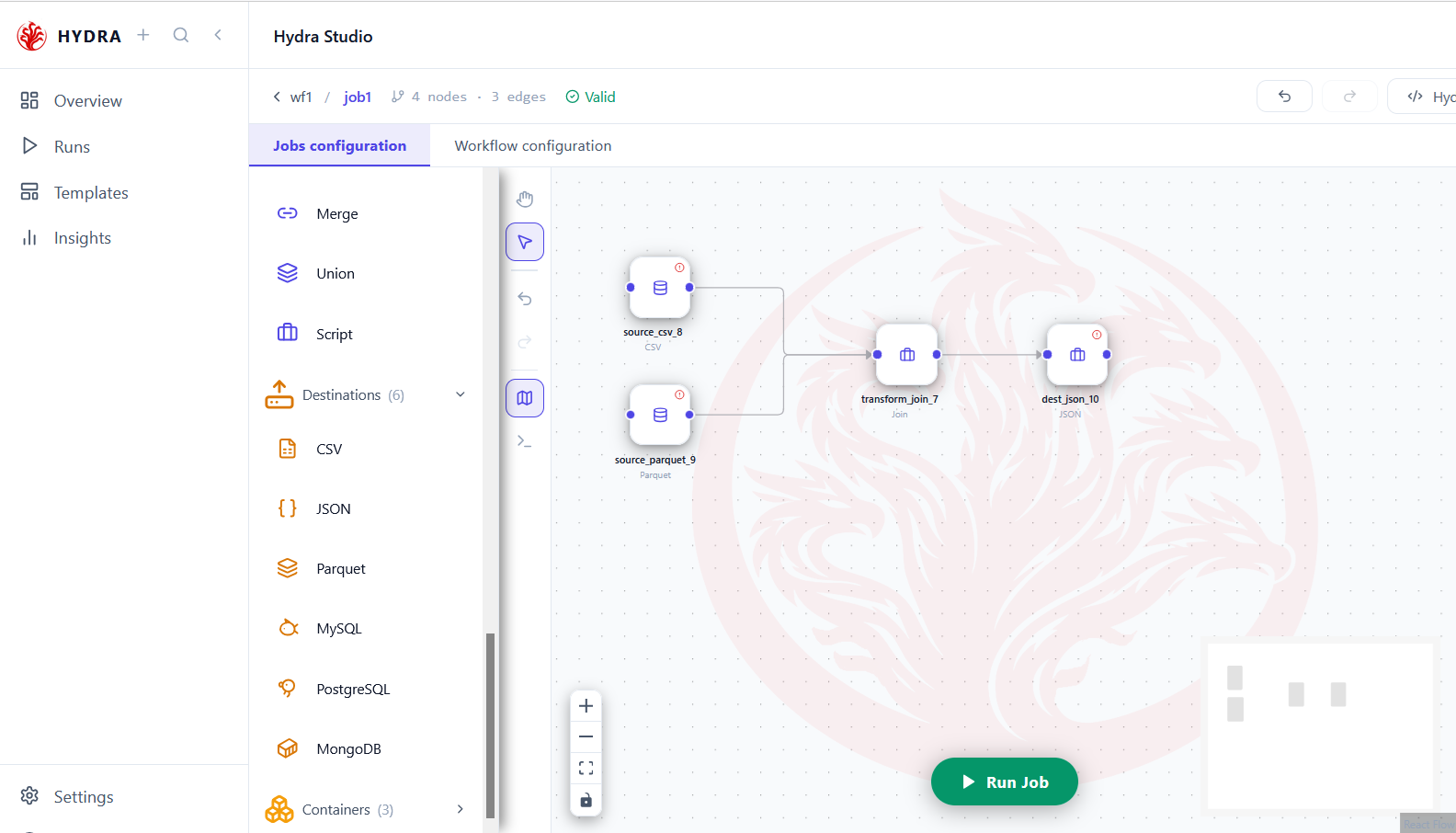
A job may read from several places at once. Two sources of different formats — a CSV and a Parquet file, say — can meet in one node and leave as a single stream. That is the whole purpose of the Combine family.
| Operation | Brings the two streams together by |
|---|---|
| Join | a shared key, keeping the columns of both sides |
| Merge | a key, updating rows rather than widening them |
| Union | stacking, when both sides already share their columns |
Two source nodes, two edges reaching the same transformation, and a single stream leaving it. The job stays Valid throughout.
wf1 / job1   4 nodes · 3 edges   Valid
source_csv_8      ↘
                    transform_join_7 → dest_json_10
source_parquet_9  ↗
Tips and traps
Pick the family first — choose, change, reshape or combine. The operation name follows on its own.
The order of the chain is the job. Filter before cast and cast before filter give different results.
A source has no input, a destination no output. That is why some edges refuse to connect.
A red badge on a transformation means a required field is empty, not that the chain is wrong.
Several sources may converge on one Join, Merge or Union. Reading from two places is normal.
Reach for Script last. Seventeen named operations are read by everyone; your Python is read by you.
Filter early. Rows dropped at the start are rows every later step no longer carries.
A Union expects the same columns on both sides. Align them with Select or Rename first.
3. Checklist
| Verification | Expected result |
|---|---|
| Palette | Eighteen transformations, Script last |
| Placement | The node connects between source and destination |
| Chain | Node order matches the list in transformations.yaml |
| Direction | No edge can reach a source or leave a destination |
| Convergence | Two sources may feed one Join, Merge or Union |
| Status | The job reads Valid once every badge has cleared |
4. Troubleshooting
| Symptom | Cause | Fix |
|---|---|---|
| The edge will not connect | Wrong handle, or wrong direction | Drag from a right handle to a left one, source towards destination |
| A transformation keeps its badge | Its required field is empty | Double-click it and fill the field marked with a red asterisk |
| The result is not what you expected | The steps run in the order of the chain | Read the Transformations tab of Hydra DSL and reorder the nodes |
| A Union produces empty columns | The two sides do not share their columns | Add Select or Rename before it to align them |
| No Transformations in the palette | You are in the workflow scene | Switch to Jobs configuration |
5. Next lesson
The data now enters and is reshaped. One node is still missing, and it is the one that makes the job runnable: the destination.