

Close the job with a destination
A short lesson, because you already know most of it: a destination is configured exactly like a source. One rule differs, and it is worth the five minutes.
1. Objective
Goal
Add the node that ends the job, recognise that its dialogs are the ones you already filled in for sources, and learn the single rule that sets destinations apart: a job writes to exactly one place.
Keep one cumulative Studio project named studio-course, one manual workflow named first-workflow, and one job named first-job. Each lesson builds on the state saved by the previous one.
Prerequisites
- Hydra API started with
hdrctl serve. - Studio started from
Hydra/studiowithnpm run dev. - A job with a source and at least one transformation.
2. Steps
01Read the six destinations
Objective
See what Hydra can write to, and notice what is missing.
Actions
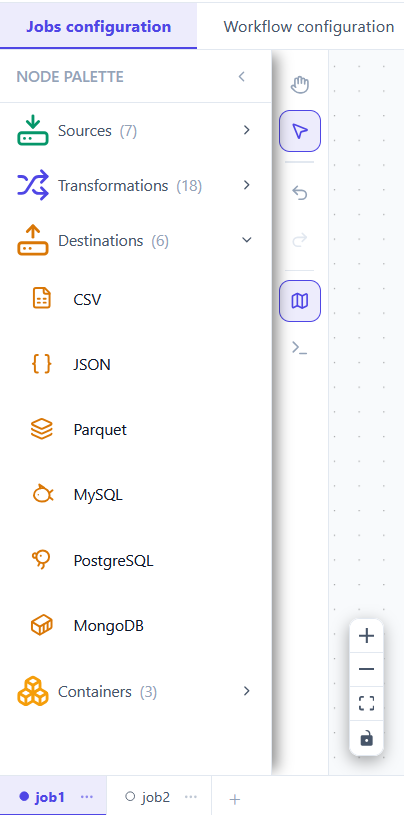
- Expand Destinations in the job palette.
- Compare the list with Sources just above it.
- Count the difference.
Jobs configuration → Destinations (6)
Six connectors, and you have met all six already — three file formats and three databases. The seventh source, Web API, has no counterpart here: Hydra reads from an HTTP endpoint but never writes to one. To send data out over HTTP, orchestrate a Webhook action in the workflow scene instead.
Seven entries on the way in, six on the way out. The difference is one, and it is deliberate.
Sources        CSV  JSON  Parquet  MySQL  PostgreSQL  MongoDB  Web API
Destinations   CSV  JSON  Parquet  MySQL  PostgreSQL  MongoDB
02Configure it — you already know how
Objective
Fill in a destination, and recognise the dialog.
Actions
- Drag CSV from Destinations onto the canvas.
- Connect the last transformation to it.
- Double-click it and set the output path.
Destinations → CSV → connect → File path → Save
The dialogs are the ones from lesson 5, unchanged. A file destination asks for a path; a database destination asks for host, port, database, user and password — and the same rule applies to the password: write ${ENV:MY_SECRET} and keep the value under Environments, never in the manifest.
| Destination | What it asks for |
|---|---|
| CSV · JSON · Parquet | An output path. Browse writes one that exists. |
| MySQL · PostgreSQL · MongoDB | A connection and a target table or collection. |
The red badge clears as soon as the required field is filled, exactly as it did for the source.
CSV  DESTINATION   Writes a CSV file
  STEP NAME   dest_csv_1
  FILE PATH * ./output/result.csv
03One destination, and one only
Objective
Learn the rule that separates destinations from every other node.
Actions
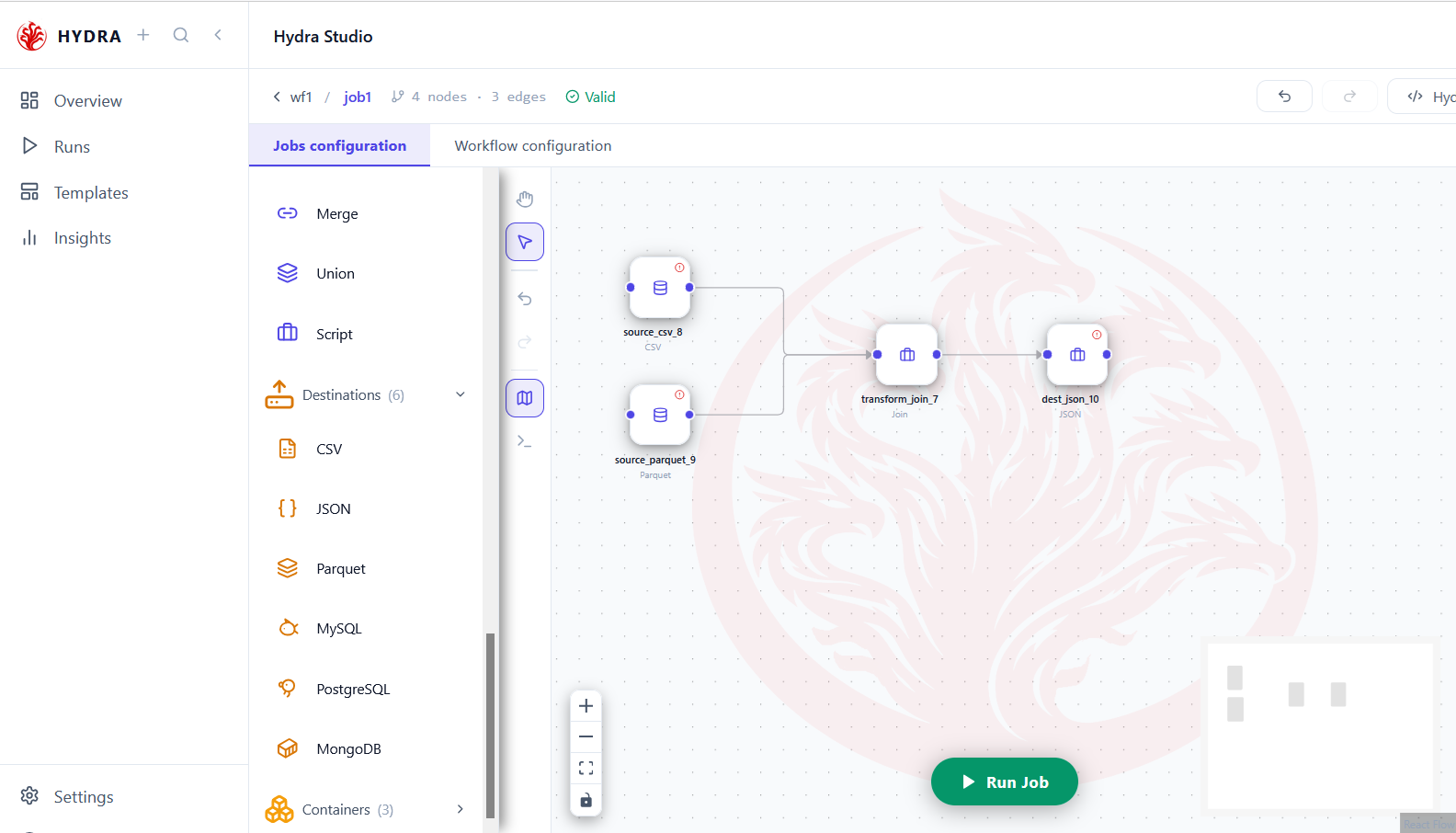
- Look at the shape of the finished job, from left to right.
- Count the sources, then the destinations.
- Read the Pipeline tab of Hydra DSL.
Hydra DSL → Pipeline
A job may read from several sources and chain several transformations. It writes to exactly one destination. Branching is allowed upstream, where streams converge; it is not allowed downstream, where the job would have to split.
| Node | How many | May branch |
|---|---|---|
| Sources | one or more | Yes — several may converge on one transformation |
| Transformations | none, one or many | Yes, as a chain |
| Destination | exactly one | No |
That is why pipeline.yaml holds a single from and a single to. If you need the same data in two places, write two jobs and orchestrate them in the workflow — which is what the next lessons build towards.
One from, one to, and identifiers rather than paths.
pipeline:
  from: source_csv_8
  to:   dest_json_10
Tips and traps
A destination is configured exactly like a source. Same dialogs, opposite direction.
A job writes to one destination. Two outputs means two jobs, joined in the workflow.
Branching is allowed upstream only. Sources converge; destinations never split.
There is no HTTP destination. To push over HTTP, use the Webhook action instead.
A password belongs in Environments, written as ${ENV:NAME} — in a destination as in a source.
Nothing can follow a destination. It has no output handle, and that is why the edge refuses.
3. Checklist
| Verification | Expected result |
|---|---|
| Palette | Six destinations, no Web API |
| Dialog | The same fields as the matching source |
| Count | Exactly one destination on the canvas |
| Pipeline tab | One from, one to |
| Status | The job reads Valid |
4. Troubleshooting
| Symptom | Cause | Fix |
|---|---|---|
| No HTTP destination in the list | Web API is a source only | Use the Webhook action in the workflow scene |
| A second destination is refused | A job writes to one place | Create a second job and orchestrate both |
| Nothing connects after the destination | It has no output handle | Expected — the destination ends the job |
| The badge stays after saving | The output path or table is empty | Reopen the node and fill the field marked with a red asterisk |
5. Next lesson
The job is complete: it reads, reshapes and writes. The next lesson opens the manifests Studio has been writing all along, and checks that they say what you meant.