

Everything below runs on a laptop with one install and no service to start: no database, no Docker, no cluster. You will generate a million-row CSV, describe the job in four small YAML files, check it before it runs, execute it, then run the exact same job on the optional Rust engine and compare.
Total time: about five minutes.
1. Install
pip install hydra-etl # 0.10.2 or laterPython 3.9+, Linux, macOS or Windows. Nothing else.
One rule for the whole tutorial: create an empty folder, and run every command from it. That folder is the Hydra ETL job — the manifests sit at its root and data/ sits inside it. By the end it looks like this:
orders-demo/            ← your terminal stays here, always
├── gen.py
├── sources.yaml
├── transformations.yaml
├── destinations.yaml
├── pipeline.yaml
├── workflow.yaml
└── data/
    ├── orders.csv       (generated in step 2)
    └── orders_clean.csv (written in step 5)
mkdir orders-demo && cd orders-demoIf you use a virtual environment, create it here too (python -m venv .venv) and activate it before installing.
2. Make the data (no download, no hunting on your disk)
Save this as gen.py and run python gen.py. It uses the standard library only and takes a few seconds.
import csv, random
random.seed(42)
with open("data/orders.csv", "w", newline="") as f:
    w = csv.writer(f)
    w.writerow(["id", "customer_id", "country", "price", "qty"])
    for i in range(1, 1_000_001):
        w.writerow([i, random.randint(1, 50_000), random.choice(["TN","FR","DE","ES","PT"]),
                    round(random.uniform(-5, 500), 2), random.randint(1, 10)])
mkdir data && python gen.py # from orders-demo/You get data/orders.csv, 1,000,000 rows, about 25 MB. Note the negative prices: that is the dirt we are going to filter out.
id,customer_id,country,price,qty
1,41906,TN,7.63,5
2,16050,FR,65.47,2
3. Describe the job — four files, 30 lines
sources.yaml
version: "1.0"
sources:
  src_orders:
    type: csv
    connection:
      base_path: data
    extract:
      table: orders.csv
      batch_size: 100000
transformations.yaml
version: "1.0"
steps:
  - cast:
      mapping:
        id: int
        customer_id: int
        price: float
        qty: int
  - filter:
      expr: "price > 0"
  - calculate:
      column: total
      expr: "price * qty"
destinations.yaml
version: "1.0"
destinations:
  dst_clean:
    type: csv
    connection:
      base_path: data
    load:
      table: orders_clean.csv
      mode: replace
pipeline.yaml
version: "1.0"
pipeline:
  from: src_orders
  to: dst_clean
That is the whole job: fix the types, drop invalid rows, compute a column. A reviewer can read it in a pull request without running anything.
4. Check it before it runs
The . means “the job in the current folder”, so run this from orders-demo/, not from data/:
hdrctl validate --strict . ok sources.yaml — Pydantic valid
ok destinations.yaml — Pydantic valid
ok transformations.yaml — Pydantic valid
ok pipeline.from — resolved: src_orders
ok pipeline.to — resolved: dst_clean
Strict checks
ok Recognized operations — cast, filter, calculate
ok filter.expr — 'price > 0'
ok calculate.total — 'price * qty'
✅ DSL valid — no errors detected.No data was read and nothing was written. Try breaking something on purpose — rename dst_clean in pipeline.yaml, or write price * (qty — and run it again: validation fails with exit code 1, which is what you want in CI.
5. Run it
Still from orders-demo/:
hdrctl run .The result lands in data/orders_clean.csv: 990,055 rows (about 1% of the rows had a negative price and were dropped) plus the new total column.
id,customer_id,country,price,qty,total
1,41906,TN,7.63,5,38.15
6. Same job, Rust engine
Part of the engine has an optional Rust implementation. It is off by default; turning it on changes nothing else about the job.
pip install "hydra-etl[native]"
HYDRA_BACKEND=rust hdrctl run .          # from orders-demo/
On Windows PowerShell, set the variable first:
$env:HYDRA_BACKEND = "rust"
hdrctl run .
Measured on two machines, three runs each, on the 1M-row file above:
| Machine | Python (default) | Rust (HYDRA_BACKEND=rust) | Faster by |
|---|---|---|---|
| Windows 11 (25H2), Python 3.13.7 | 6.4 · 6.5 · 6.7 s | 3.5 · 3.7 · 3.8 s | ~42% |
| Linux VM, Python 3.10.12 | 8.5 · 8.7 · 9.2 s | 6.4 · 6.8 · 7.6 s | ~22% |
Between 20% and 45% faster end to end, depending on the machine. Be careful with bigger claims you may read elsewhere, including ours: the Rust part accelerates CSV reading, and reading is only one stage of this pipeline. Speeding up one stage by 4× does not make the whole job 4× faster — and the share it represents depends on your disk, your filesystem and what else runs on the machine.
One run out of the six on the Windows laptop came out at 7.7 s with the Rust engine, twice the other two. That is what a background process looks like in a benchmark; we report it rather than hide it. Run each engine at least three times before drawing a conclusion on your own hardware.
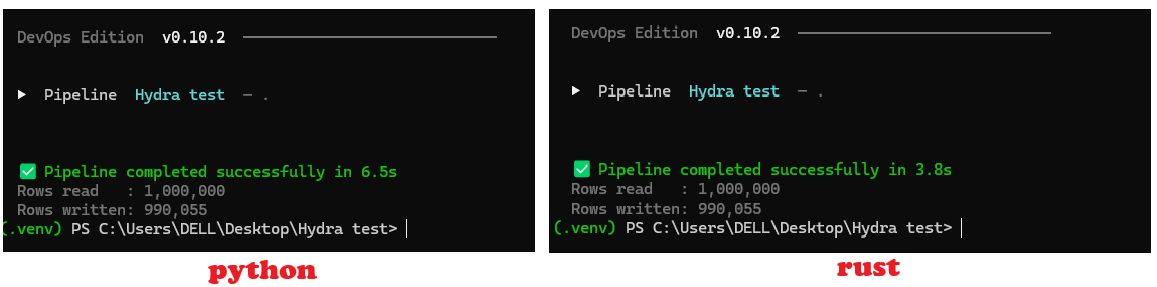
The output is the same, byte for byte:
md5sum data/orders_clean.csv # identical after a Python run and after a Rust runThat is the point of the Rust backend: same results, less time on the read, and an automatic fallback to Python whenever that guarantee cannot be kept.
7. Let Hydra ETL time itself
Timing a job with a stopwatch is fine once. In practice you want the pipeline to report on itself — and that is what workflows are for. A workflow orders several steps in a DAG; a step is either a job or an action (Python, Bash, PowerShell, SSH, webhook, email…).
Here, three steps: start a timer, run the job, report. The actions are Python, so the same file works on Linux, macOS and Windows.
workflow.yaml
workflow:
  name: "timed_clean_orders"
  description: "Clean one million rows and report how long it took"
  trigger:
    type: manual
  steps:
    - name: "start_timer"
      type: action
      action: python
      params:
        script: "import time, pathlib; pathlib.Path('.hydra_t0').write_text(str(time.time())); print('timer started')"
      depends_on: []

    - name: "clean_orders"
      type: job
      job: "."
      depends_on: ["start_timer"]
      on_failure: fail

    - name: "report_time"
      type: action
      action: python
      params:
        script: |
          import time, pathlib
          t0 = float(pathlib.Path(".hydra_t0").read_text())
          rows = sum(1 for _ in open("data/orders_clean.csv")) - 1
          seconds = time.time() - t0
          print(f"{rows:,} rows written in {seconds:.1f} s ({rows/seconds:,.0f} rows/s)")
      depends_on: ["clean_orders"]
Workflows are validated before they run, exactly like jobs:
Again from orders-demo/, where workflow.yaml now sits next to the four manifests:
hdrctl workflow validate ./workflow.yaml
hdrctl workflow run ./workflow.yaml
Workflow timed_clean_orders
────────────────────────────────────────────────────────
✓ Step 'start_timer' OK (0.0s)
│ timer started
✓ Step 'clean_orders' OK (7.8s)
✓ Step 'report_time' OK (0.2s)
│ 990,055 rows written in 7.9 s (124,977 rows/s)
✅ Workflow 'timed_clean_orders' completed in 8.0s — 3/3 steps OKTwo things happened here. The runner reported the duration of each step, which is the cheapest profiling you will ever set up. And the report came out of the pipeline itself, so the same action could just as well push it to a webhook, send it by email, or write it next to the data.
Run the same workflow with HYDRA_BACKEND=rust and you get the Python-versus-Rust comparison above without touching a stopwatch.
What this shows
- A pipeline is a few readable files, versioned with your code.
hdrctl validatefails fast on your laptop or in CI, before a single row is read.- One
pip installand no infrastructure.
When not to use Hydra ETL
If you orchestrate hundreds of heterogeneous tasks across a cluster, use Airflow or Dagster. If your data already lives in a warehouse, dbt is the natural fit. Hydra ETL targets file-and-database pipelines that should stay readable and run without infrastructure. It is beta: pin your version.
Next
- Code and docs: github.com/bejaouibechir/Hydra
- Try it in the browser: hydraetl.com